

PROJECT : Palico Run
ROLE : UI Artist & UX Designer
DURATION : 3 weeks
Project Overview
PalicoRun is a smartwatch fitness-focused companion app paired with Capcom's "Monster Hunter World". This project's main goal was to revise and establish an alternate means of interacting with a system within the games ecosystem through gamifying walking and jogging.
Challenges
1) Identify a mechanic within the game that provides the potential for an engaging experience without compromising the main game’s core game play loop
2) Develop Application Programming Interfaces (APIs) for our app to interact with the main game's current game state and changes it in a meaningful way
3) Create a comprehensive UI that ties in the iconography of the franchise while achieving high-level design objectives.

Palico Run display
Start Off
Our initial kickoff meeting found us asking ourselves a few key questions to structure our ideation process moving forward.
"What is the product going to be?"
"Who is the target audience for our product?"
"What makes our product stand out amongst the competition?"
"How do those existing products execute on their experience?"
"How do we incorporate our products experience into that of the companion game?"
Brainstorming
Divergent & Convergent
We began our process by first aggregating our shared experiences with the franchise. We threw together a number of mechanics we believed would provide the most interesting play experience or the most utility. We weighed in each individual member’s opinion before discussing our own pain points as users to hone in on a hand full of mechanics to possibly tackle.

Idea Map
Once established, we performed cursory research across various forums and online message boards on the grievances of the player base. Following up, we conducted
a handful of 1on1 interviews focused on participant's reception of the mechanics we selected such as: current implementation, reward streams, pain points, learning curve, ease of access, etc.
We divided mechanics based on the games two distinct states of play: “In-field” and "In-hub”; further subdividing them based on player engagement levels
Following this, we refined our selection further by examining the high-priority mechanics ( rated 1) then mid-priority mechanics (rated 2). What we discovered was that isolating their functionality to a remote device would be either detrimental to the “magic bubble” phenomena or worse, redundant, as players would rather engage with them through conventional means.
This resulted in us pivoting our focus to the low priority mechanics, with our aim being to revitalize their functionality. Capitalizing on their PROS whilst minimizing their CONS.
1 - Often (high priority)
2 - Occasionally (mid priority)
3 - Rarely (low priority)
FIELD Activities
HUB Activities
Fast Travel 1
Managing Items 1
Item Crafting 1
Utilizing Scout Flies 1
Utilizing the Slinger 1
Changing Loadouts 2
Guildarm Chef 2
Monster Tailing/ Discovery 2
SOS 3
Palico Chef 1
Weapon Crafting 1
Item Chest/Loadouts 1
Quest/ Bounty Board 1
Talisman Crafting 2
Item Harvesting 2
Monster Ecologist 3
House Decoration 3
Tailraiders Safari 3
Argosy 3

Who are our users?

Micheal Brown
Age : 32 | Teacher
While very active and very passionate about Monster Hunter World, Mike doesn't have as much disposable time to partake in all the sub-mechanics the game offers to gather resources. This results in him taking breaks from the game as he finds it a tad overwhelming and tedious to keep up which only exacerbates the downtime experienced whenever he does return. The app provides an integrated, alternate stream for both resources & crafting materials for Mike while he’s tackling his busy day

Karen Stockle
Age : 16 | HS Student
As a member of her highschool’s football team, Karen is constantly on the move whether at training or at school. Though she finds herself with the spare time to play and keep updated with the game and her friends, her competitive nature always nudges her to seek out as much of an edge as possible. Though viewed more as a bonus, Karen utilizes the app to top off her resources, raise her palico, & start alternate armour sets by collecting materials whilst out running on the football field or the busy halls of her high school.
Shared Spaces
We went through some of the top-rated companion apps to analyze the features and treatment provided for their users.
Although none fell directly in line with what we envisioned for our product we gained valuable insight for design considerations.
Outside the sphere of gaming, the product that bears the most resemblance to ours would be “Fitbit” and their app.
Considering the limitations of our platform (smartwatch) & our initial design goals we were presented with a few key takeaways :
POSITIVES
Stat tracking
Setting Goals
Earning Achievement
Social Features
NEGATIVES
- High-level user execution
- Information dense systems
- Undefined entry and exit points
- Overlap between in-app and in-game functionality


Researched Apps
Player Journey
We laid out Flowcharts to visualize the basic user journey, focusing on the core feature of our product ( step tracking/ jogging) and slowly reiterating to add secondary features and mechanics.

Initial | User Journey 1.a

1st pass Iteration | User Journey 1.b

2nd pass iteration | User Journey 1.c

Feature Complete | User Journey 1.d
LEGEND
Fitness Features
Gamify Features
Wireframes & Iterations

Paper Prototype | User Journey 2.a


Figma | Layout Iterations 2.b

Wireframe Prototype | User Journey 2.c
Key Takeaways & Lessons

1)
Be Legible
The user needs to understand, at first glance what the information is that you are trying to display.

2)
Be Concise
Get straight to the point. Remember that you will have just a few seconds between the moment your users receive your app notifications and raise their wrist

3)
Be Timely
Show the most relevant information to the user in the smallest amount of time as possible. Like that, you are making your App more relevant for the user
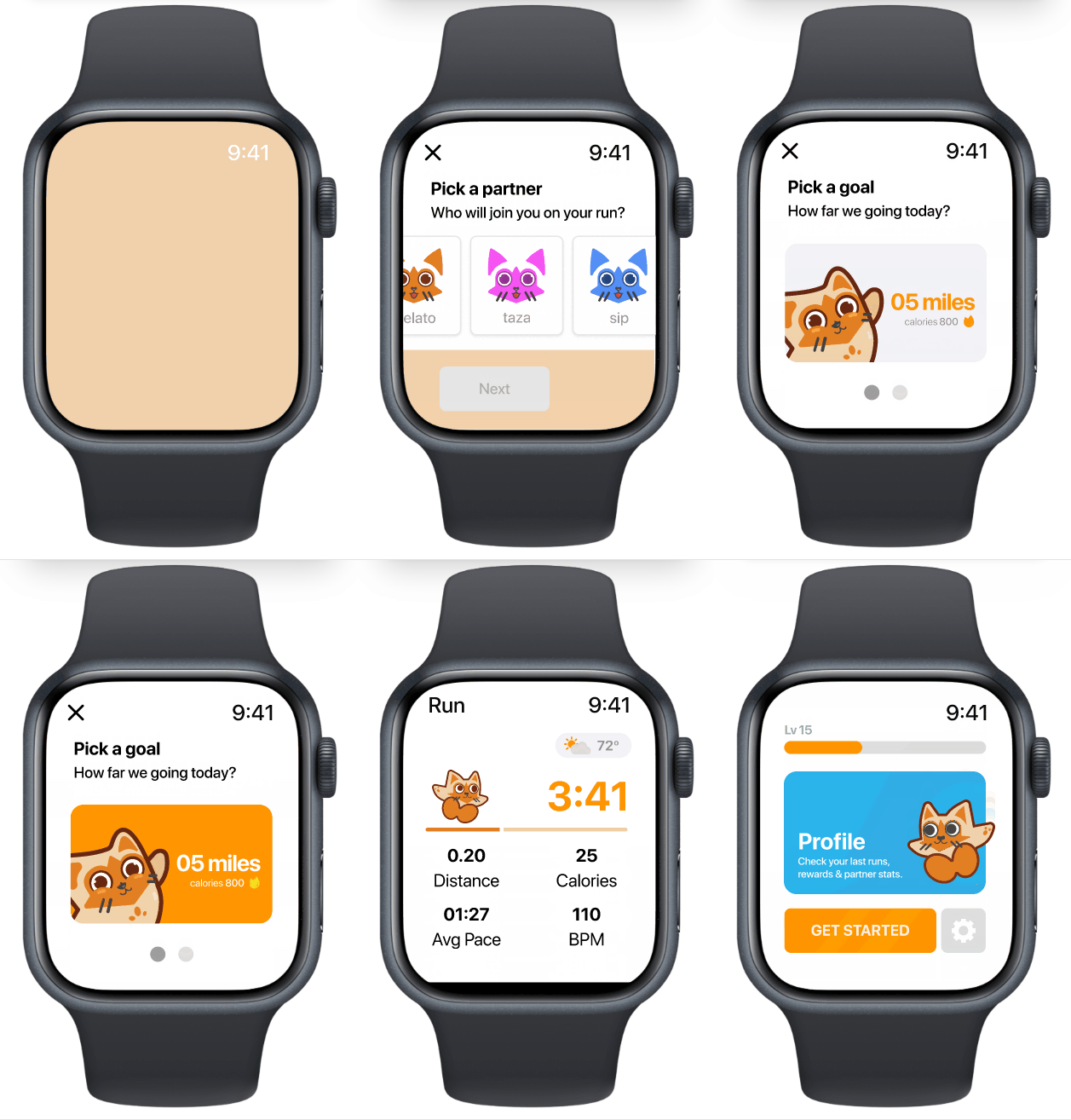
Prototype
This prototype runs through the crucial path of the user journey, demonstrating UI Art, micro-interactions
and motion design.
Check it out on Figma
THANK YOU
Lets create together! Feel free to reach out to me stevierayca@gmail.com

The Team
Leona WU
Stevie Ray HUNTER
Nolan GRANT
Chavaiz AMIL

